
Document Object Model
I began my career as a software developer after obtaining a degree in Computer Science from a Pune university. I quickly found that I had a passion for coding and problem-solving, and I have spent the last several years honing my skills in various programming languages and technologies. I have experience in developing web applications, mobile applications, and desktop applications, and I am always eager to learn more about emerging technologies.
As I progressed in my career, I discovered another passion: writing. I began to explore content writing as a way to express myself creatively and share my knowledge with others. I found that I had a knack for explaining complex technical concepts in a way that was easy for others to understand, and I soon began writing articles and blog posts on topics related to software development.
Today, I work as a freelance software developer and content writer, taking on projects that allow me to combine my technical expertise with my love of writing. I have worked on everything from developing custom software solutions for small businesses to creating engaging content for technology websites and blogs. I am dedicated to delivering high-quality work that meets the needs of my clients, and I am always looking for new and exciting projects to take on.
The words “the DOM” are used all over developer documentation sites and tutorials on writing interactive JavaScript code
When you request a website, no matter what backend language is powering that website, it will respond with HTML. The browser receives a stream of HTML. The bytes are run through a complicated (but fully documented) parsing process that determines the different characters (e.g. the start tag character <, an attribute like href, a closing angle bracket like ```
1. DOCTYPE
2. start-tag
3. end-tag
4. comment
5. character
6. end-of-file

Let’s take a break for a second. At this stage, the browser has received the bytes that’ve been sent by a server. The browser has converted the bytes to tags and has read through the tags to create a list of tokens.

This list of tokens then goes through the tree construction stage. The output of this stage is a tree-like structure — this is the DOM!

I want to point out two important quotes that Illya said in the video:
**a tree structure that captures the content and properties of the HTML and all the relationships between the nodes the DOM is the full, parsed representation of the HTML**

So the DOM is a model (representation) of the relationships and attributes of the HTML document that was received. Remember that DOM stands for “Document Object Model”. Something that I’ve found to be true as I’ve been learning is that to break something down, just read the thing backwards:

Document Object Model

…would become…

Object Model of the Document!

Remember that a JavaScript object is a tree-like structure that has properties and values. So the DOM can be accessed using a special object provided by the browser:
document ```
Try this:
open the console on this page
type out the word document
careful not to declare it const document
careful not to wrap it in quotes document
press enter
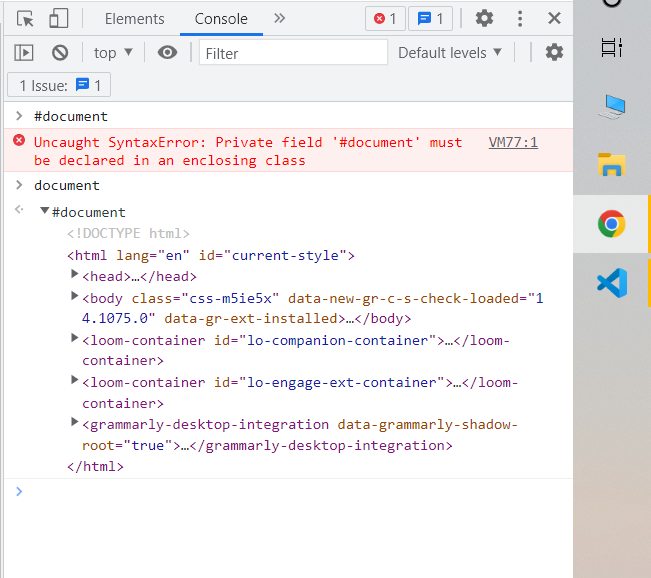
Viewing the document object in the DevTools' Console pane.
The document the object is provided by the browser and is a representation of the HTML document. This object is not provided by the JavaScript language. ECMAScript is the language specification that JavaScript is based on, and it only references the document object model in one place, in its "Global Object" section:
In addition to the properties defined in this specification, the global object may have an additional host-defined property. This may include a property whose value is the global object itself; for example, in the HTML document object model, the window property of the global object is the global object itself. (source)
Basically, this says that the document object is not part of JavaScript, but is expected to already exist and be freely accessible to JavaScript code.
The DOM is standardized by the W3C. There are a number of specifications that make up the DOM, here are a few:
Core Specification
Events Specification
Style Specification
Validation Specification
Load and Save Specification


